
In our previous piece, Trust in AI: Who’s Doing the Trusting?, we dissected the human side of the relationship - looking at how user personalities, workplace politics, and organizational dynamics dictate whether people actually use AI. But analyzing human baggage is only half the fun. Now it’s time to look at the tools itself. Because once you figure out who is doing the trusting, you quickly realize the product on the other side of the screen is doing plenty of weird, chaotic, and overly confident things to earn - or completely wreck - that trust.

If you put a UX designer and a machine learning engineer in a room to discuss user trust and reliance, you’ll usually hear two magic words: model performance and transparency.
The engineer will insist that if we just optimize accuracy, shave 200ms off latency, and crush the hallucination rate, users will trust the system because it is reliable.
The UX department will counter that reliability isn’t enough and we absolutely need to show users the thinking process, otherwise there’s no chance for high adoption.
Both sides will bring spreadsheets and decks. Engineers will cite contextual accuracy and benchmark scores. UX will cite A/B test conversion lifts. Even academia backs them up: a meta-analysis of over 700 scientific studies on automation trust concluded that system capability and reliability are the single biggest predictors of human trust [ref].
Case closed, performance reviews nailed, let’s go home, right?
Not quite. Reality, as usual, is an unhelpful mess.
First, there are far more product-related factors beyond raw performance that can significantly impact user trust and reliance.
Second - as we have already discussed - building a trustful system isn't about cranking user trust to maximum; it’s about calibration. You do not want users to blindly trust an AI that shines with confidence while miscalculating a loan application, fabricating legal precedent, or hallucinating a non-existent API parameter.
We don’t optimize for user engagement by creating safety hazards.
Real product trust lives in a tricky spot: we need to get users to rely on the system when it’s right, motivate them to inspect it when it’s shaky, and slam the brakes right before it drives off a cliff.
Product-related trust factors fall into three main categories - and as you’ll see, high reliability alone isn't a golden ticket, while our beloved transparency can easily backfire into a dangerous illusion.
Group 1: Performance, reliability, and safety boundaries
Aka What the system actually does
This is the engineering heavyweight category: core capability, stability, and operational track record. While reliability is the strongest empirical predictor of trust, the pattern of failures - and how safely the system fails - matters just as much as raw accuracy.
1. Push down unpredictable AI errors to prevent user hyper-vigilance
Imagine a toaster that slightly burns the left corner of your bread every single time. It’s annoying, but it’s predictable. You learn the workaround: you flip the bread halfway through. You keep using the toaster.
Now imagine a toaster that toasts perfectly 90% of the time, but randomly turns your bread into radioactive ash 10% of the time without warning. How probable it is that the hell machine goes straight to the trash?
Human-AI relationships work the same way. Users can tolerate systematic, predictable errors (“It always formats dates in US style, so I'll just change it”). They adapt and build workarounds. But inconsistent, unpredictable errors force users into a state of hyper-vigilance. The cognitive load of constantly monitoring landmines might erode trust faster than a known, repeatable issue.
Predictable flaws build workarounds; random errors build churn.
Users can adapt to repeatable, systematic AI bugs. But chaotic, unpredictable failures create extreme cognitive overload and quickly erode trust.
2. Ship calibrated baseline features to avoid early impression penalties
First impressions don't just matter on a first date - they dictate automation bias. When an error occurs matters just as much as how often it occurs. An error on a user's first or second attempt triggers an “expectation-disconfirmation” shock: a user who assumed the model was “smart” is abruptly shoved into reality [ref].
This means there is dangerously little room for MVPs in AI. If you roll out a half-baked feature that is likely to fail, users label the product as “dumb” or “unsafe” and you will spend the next six months trying to win back baseline credibility.
First-turn failures ruin products faster than low overall accuracy.
Early errors can permanently disconfirm expectations. A shaky AI MVP may damage baseline credibility that takes months to rebuild.
3. Signal operational limits and edge cases to prevent confident hallucinations
Models are usually trained on pristine datasets. But real-world inputs are filthy: blurry scans, out-of-distribution prompts, noisy audio, and malicious prompt injections. Taking inspiration from traditional software, users expect that when an AI hits an edge case it can't handle, it will raise its virtual hand and say, “I don't know” - showing some kind of error. Instead, many models are trained to deliver an answer no matter what, and might fabricate an answer with serene confidence.
From a safety and product perspective, a high-performing AI system must signal its own operational limits. When an input is ambiguous or enters a high-stakes domain (like medical advice or safety-critical code), the product shouldn't just run the model and hope for the best. It must trigger guardrails: asking for clarification, marking out-of-scope queries, flagging low confidence, or enforcing mandatory human-in-the-loop sign-off.
When inputs get messy, force operational limit signaling.
Never let a model fabricate confidently-looking answers under stress. Trigger low-confidence warnings, request prompt clarifications, or require mandatory human-in-the-loop sign-off.
4. Balance generation latency with verification effort to keep net efficiency positive
Latency isn't just a technical metric; it’s a trust and reliance signal. Faster isn't always better - an instant response to a complex prompt can feel unnerving, cheapening perceived output quality [ref]. You will need a bit of experimentation with response speed to create certain impressions on users and see what is the right latency that is correlated with user trust and reliance.
Furthermore, “inspection tax” matters: if a system generates code in 0.2 seconds but checking it for security vulnerabilities takes 20 minutes, the net efficiency is negative.
Speed is useless if inspection takes forever.
If an instant AI output requires 20 minutes of auditing to ensure safety, net efficiency is negative. Optimize for total time-to-verified-completion, not raw latency.
Group 2: Attributes and interaction style
Aka How the System Presents Itself
This category covers interface affordances, voice and tone, GUI, and communication style - basically, all the perceptual lenses through which users evaluate the AI.
1. Pair explanations with decision-point friction to stop over-reliance
The most common transparency tools are showing step-by-step reasoning (chain-of-thought) and grounded source citations. Seeing how the sausage is made helps users build mental models on the trustworthiness of output, verify factual claims, and mitigate hallucinations [ref].
However, transparency alone does not magically create and calibrate trust. It was shown that explainability has a modest effect on reliance (the smallest of all the product factors), and passive explanations alone do not reliably reduce overreliance [ref].
In fact, hyper-polished explanations can backfire: when a flawed output is accompanied by a nice and crispy source links and logical-looking bullet points, users are more likely to blindly trust it. To be safe, transparency must be paired with decision-point friction - forcing users to inspect outputs specifically when the system signals low confidence.
Polished explanations can manufacture overtrust.
Sleek reasoning steps and source links can make flawed outputs look hyper-credible. Pair transparency with active friction gates when model confidence drops.
2. Anthropomorphism: avoid the cute avatar trap to tailor trust in functional contexts
Product teams love debating whether to use a humanlike avatar or an abstract icon for their AI chat. (In Europe, Article 50(2) of the EU AI Act makes this debate legally spicy by mandating clear disclosures that users are talking to an AI.)
Visually humanizing an AI triggers social heuristics, inducing users to attribute empathy, moral reasoning, and human competence to software. On the bright side, this can boost short-term warmth. But it also creates a massive calibration risk: users forget system limits and skip critical verification steps since they attribute human reasoning, empathy, and competence to the AI product [ref, ref].
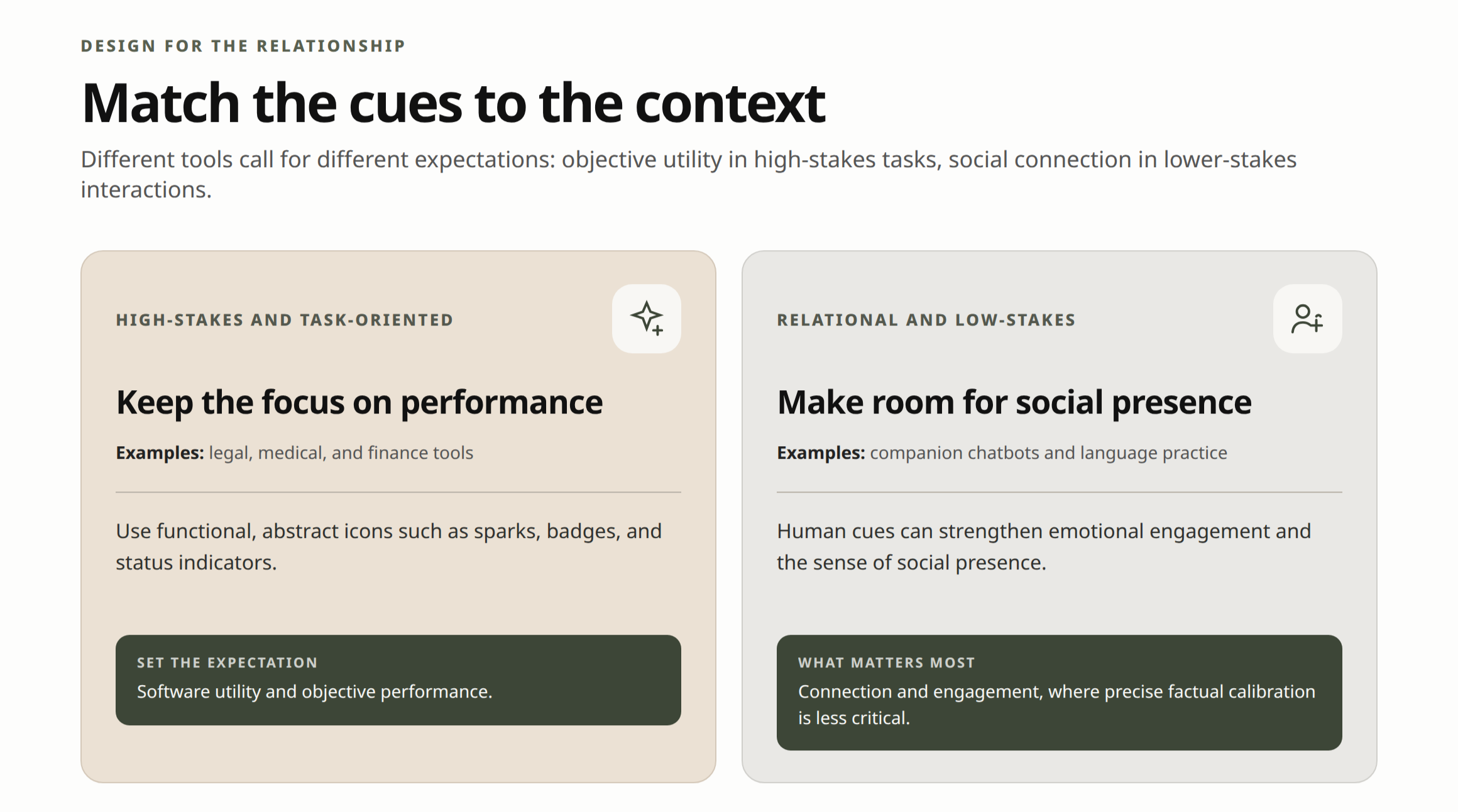
To calibrate trust early, you might prefer to use functional icons instead of human avatars (as well as other abstract visual markers (like spark icons, processing indicators, or tool badges) across the whole user journey) in all task-oriented or high-stakes environments (i.e. medical or legal) where users prioritize efficiency, clarity, and objective performance.
In the systems where empathy matters - in casual or relational settings (such as companion chatbots designed for emotional support or language practice), human cues and avatars can enhance feelings of social presence and engagement [ref] while precise trust calibration becomes less critical.
Group 3: Interactivity, agency, and control
Aka How the System Relies on the Human
The ultimate safety valve in AI product design isn't inside the algorithm; it's the control panel you give to the user.
1. Build contestability and reversibility mechanisms to protect high-stakes decisions
Let’s repeat the basics. The level of agency you give users spans from passive consumption to full supervisory control. The higher the stakes, the more critical contestability becomes - the explicit ability for humans to oppose, challenge, adjust, or override AI decisions.
Product teams often worry that adding verification steps adds unnecessary friction. But in high-stakes workflows, friction is your safety net. It doesn’t mean that your next step is to allow all users to tune model parameters and modify underlying mechanics. Finding the right definition of what control means and the right level of it will be iterative and you would need to fine-tune based on user research and telemetry analysis (jump to “Who’s doing the trusting” article to read more on this!).
You might want to start with implementation of the best practices for high-stakes environments (usually includes granting users the ability to correct outputs and override decisions) and iterate.
One last important step is to ensure that your users don’t get stuck in the error loop and design for error recovery. Showing rationale previews before an agent acts, low-friction undo buttons, and a clear override path can reduce user anxiety and build long-term confidence in delegating tasks to the system.
Bonus: justified human disagreement makes the system smarter over time [ref]. When domain experts use override controls to correct algorithmic mistakes, those interventions provide high-quality data to fine-tune future model iterations.
Contestability is non-negotiable when stakes are high.
Give users clear ways to challenge, edit, and revert AI actions. These controls are your primary safety net.
2. Establish proactive boundary coaching and recovery loops to prevent user dead-ends
Unlike traditional software with static menus to explore and predictable buttons, conversational and probabilistic AI interfaces require users to discover capabilities turn-by-turn [ref]. In some cases it might cause user confusion about the true scope or unrealistic expectations regarding the capabilities of the tool.
To set realistic boundaries early, products should use opening messages, proactive onboarding cheat sheets or guided tours.
But onboarding isn't enough; even well-onboarded users will inevitably run into out-of-scope boundaries or experience errors, and start to doubt the system capacities. If a user hits a dead end, don't drop them into an AI void. AI should recognize its own limits and trigger clear out-of-scope notifications, as well as provide low-friction recovery paths: suggested prompts, back buttons, or explicit reset controls to pull them back into supported, safe workflows.
At the same time, users that hit a wall are likely to ask ability-check questions ( “What can you do?” or “Can you access my bank account?”) to re-establish common ground [ref]. Recognizing these meta-questions and answering them accurately - without hallucinating capabilities - is vital.
Never abandon a user in a hallucination loop.
When users reach an out-of-scope boundary or ask ability-check prompts like What can you do?
, explain the system’s limits clearly and offer one-click paths back to supported features.
The checklist below will help to ensure that your product is optimised for calibrated trust and reliance.
How to use the Trust Audit checklist
Use this framework during product design reviews, PRD sign-offs, and UXR audits to evaluate whether your AI features build appropriate reliance. Rather than aiming to maximize blind usage, these nine checks help product teams calibrate user trust - ensuring operators know when to delegate tasks to the system, when to inspect its outputs, and how to safely intervene if the output is incorrect.
